The Complete Guide: How to Reduce Administrative Work in Your Business
Posted on April 10, 2026
← Back to Hub: Back-Office Knowledge for Solopreneurs Other cluster guides: Managing Customer Data Correctly · Back Office, Not ERP
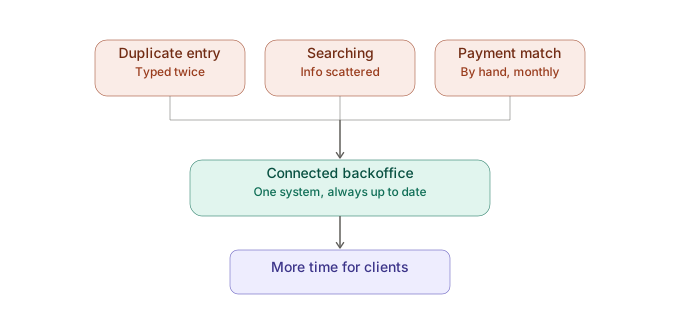 You can reliably reduce administrative work by doing three things: identifying your biggest time wasters, keeping customer data and documents in one connected system instead of separate programs, and automating recurring steps like payment matching. This guide gives you the overview — the detail articles below go deeper.
Why administrative work is so persistent for small businesses
At the start, a simple invoicing tool and a spreadsheet are enough. As your client base grows, new tools get added for individual tasks — each sensible on its own, but together they form a patchwork that forces constant data entry, searching, and reconciliation. This isn't a personal organization problem; it's a structural consequence of disconnected tools.
The key levers, at a glance
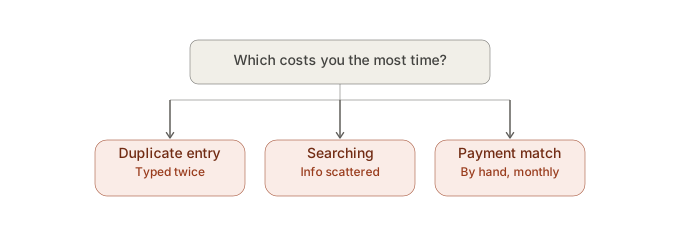
- Know your biggest time wasters — usually duplicate data entry, searching for information across programs, and manual payment matching. → What Are the Biggest Time Wasters in a Solopreneur's Back Office?
- Notice when you're entering the same data twice — every extra entry is an extra source of errors. → Why Do You Keep Entering the Same Customer Data Over and Over?
- Do the honest math on copy & paste — both the time cost and the resulting error cost. → How Much Time Does Copy & Paste Really Cost You? and Why Does Duplicate Data Entry Cost More Than Just Time?
- Recognize the warning signs of spreadsheet chaos before it becomes unmanageable. → When Does Your Office Organization Become a Problem?
- Focus on the biggest levers, not cosmetic optimizations. → How Can You Save 30 Minutes of Admin Work Every Day?
- Consolidate instead of multiplying — one connected system instead of ever more single-purpose tools. → What's the Best Way for a Freelancer to Reduce Administrative Work?
Real-world example
An IT consultant, a trade business, and a creative agency — three completely different business models — share the same pattern: once customer, invoicing, and contract data live in separate programs, every small change costs disproportionately more time. In all three cases, the fix wasn't more discipline — it was a connected system.
What you can do right now
Start with your biggest lever: figure out which of the seven time wasters linked below hits you hardest, and read that article first.
FAQ
How do I generally reduce administrative work in my business? By first identifying your biggest time wasters (usually duplicate data entry and manual payment matching), then using a connected back-office system instead of several separate tools.
Where's the best place to start simplifying my admin? Start with whatever currently costs the most time — typically payment matching, data entry, or searching for information across programs.
All articles in this cluster: Entering customer data repeatedly · Back-office time wasters · Copy & paste time cost · Spreadsheet chaos · Save 30 minutes daily · Duplicate entry costs money · Best method for freelancers
Archives
- August 2026 (1)
- July 2026 (5)
- June 2026 (4)
- May 2026 (5)
- April 2026 (4)