Back-Office Knowledge for Solopreneurs: The Complete Guide to Reducing Administrative Work
Posted on April 3, 2026
Cluster guides: Reducing Administrative Work · Managing Customer Data Correctly · Back Office, Not ERP
Short answer
Most self-employed people spend several hours every week on administrative tasks. Usually it's not because they have too many clients or projects — it's because information gets maintained in multiple places, documents get created manually, and several disconnected programs are used side by side.
A well-organized back office reduces this workload significantly. This guide walks you through which areas belong to it and how to organize them efficiently.
What is a back office?
Many people associate "back office" with large companies or corporations.
In reality, every business has a back office — including the freelancer working entirely alone.
The back office covers everything that keeps your business running but doesn't happen directly in front of the client.
Typical examples include:
- Managing customer data
- Preparing quotes
- Organizing contracts
- Creating invoices
- Tracking incoming payments
- Filing documents
- Organizing administrative processes
The better these areas work together, the less time gets lost to administration.
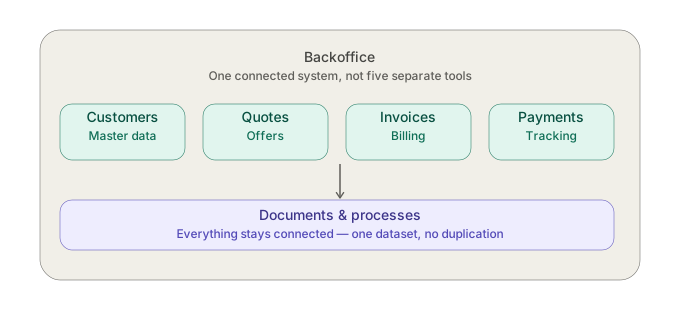
Back Office Map
                BACK OFFICE

                     │
 ┌─────────────┬──────────────┬─────────────┐
 │             │              │             │
Customers    Quotes        Invoices      Payments
 │             │              │             │
 └─────────────┴──────────────┴─────────────┘
                     │
            Documents & Processes
Each area links to the matching cluster pillar and, from there, to the relevant detail article.
Why does administrative work grow as your business grows?
At the start, things work surprisingly well. One client. One spreadsheet. One document template. One PDF.
But as your client base grows, new challenges appear: customer data lives in multiple places, invoices get rebuilt from scratch every time, changes have to be made in several places at once, documents scatter across different folders, you lose the overview.
It's not that individual tasks get harder — it's how they interact that becomes the problem.
Go deeper: Reducing Administrative Work — The Complete Guide
The biggest back-office time wasters
Common examples: searching for information, re-entering customer data, manually creating invoices, renaming documents, searching for files, switching between programs.
Go deeper: Reducing Administrative Work — The Complete Guide — including What Are the Biggest Time Wasters in a Solopreneur's Back Office?
Customer data should only exist once
Many businesses store the same information in several places: spreadsheets, email/Outlook, Word documents, invoicing software, contract files, notes. This causes errors, inconsistencies, and unnecessary rework.
Go deeper: Managing Customer Data Correctly — The Complete Guide
Why using multiple applications often creates more work
Each program serves its own purpose. The real cost comes from switching between them.
Go deeper: Managing Customer Data Correctly — The Complete Guide — including Why Is One Dataset Instead of Five Programs the Simplest Way to Less Admin Work?
Do I need a CRM or an ERP?
Most small businesses need neither a full CRM system nor an extensive ERP solution. A lean setup, where customer data, documents, and invoices are meaningfully connected, is usually enough. A back office isn't a smaller CRM or a lighter ERP — it's a different category, built specifically for the day-to-day admin of a one- to twenty-person business.
Go deeper: Back Office for Small Businesses, Explained
How do I know my administration has become too complicated?
- ✅ Customer data lives in multiple places.
- ✅ Information gets copied repeatedly.
- ✅ You can't see open invoices at a glance.
- ✅ Changes have to be made in several places.
- ✅ Setting up a new customer takes longer than it should.
Go deeper: Back Office for Small Businesses, Explained — including How Do You Know Your Admin Has Become Too Complicated?
Principles of a modern back office
- Capture information only once.
- Connect data instead of duplicating it.
- Simplify processes rather than perfecting isolated tools.
- Keep the overview at a glance.
- Regularly question your own admin setup.
Modern back-office tools such as SmoovOps are built around exactly these five principles: one connected dataset for customers, contracts, invoices, and payments, instead of five separate "truths."
Back Office Maturity Check
How well organized is your back office?
- I maintain customer data in more than one place.
- I use more than four programs for admin tasks.
- I regularly search for documents.
- I don't always know which invoices are still open.
- I frequently copy information between programs.
Results
- 0–1 checked: Your back office is already well organized.
- 2–3 checked: There's room for improvement.
- 4–5 checked: Your admin processes are likely costing you significantly more time than necessary.
Frequently Asked Questions
What exactly belongs to the back office?
All organizational tasks that support day-to-day operations — for example customer data, documents, invoices, and payments.
Is a back office only important for larger companies?
No. Small businesses in particular benefit from simple, structured processes — they have the least slack to absorb wasted admin time.
Do I need many different programs for this?
Not necessarily. Often the workload is caused precisely by information being spread across too many programs in the first place.
When should I start simplifying my processes?
As soon as you're regularly entering data twice, searching for information, or losing track of the overview.
Conclusion
An efficient back office doesn't mean the most complex software possible — it means well-organized information and lean processes. Use the linked cluster guides to jump straight to the area costing you the most time today.
Related guides:
Archives
- August 2026 (1)
- July 2026 (5)
- June 2026 (4)
- May 2026 (5)
- April 2026 (4)