Why Do You Keep Entering the Same Customer Data Over and Over — and How Do You Finally Stop?
Posted on April 17, 2026
← Back to Pillar: Reducing Administrative Work Related articles: Copy & paste time cost · Duplicate entry costs money · Entering customer data only once
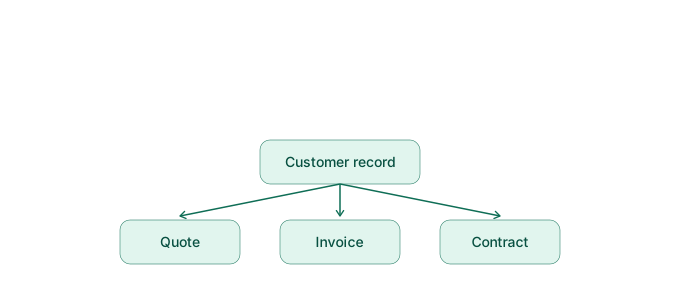 You keep re-entering the same customer name because quotes, invoices, and contracts live in separate programs that know nothing about each other. The fix is centralized data management: create the customer once, use it everywhere automatically. That's the core principle behind modern back-office tools like SmoovOps.
Why this happens in the first place
Most self-employed people start with a simple invoicing tool, a spreadsheet for contacts, and eventually a separate tool for contracts. Each tool has its own customer database. As soon as an address, email, or tax ID changes, you have to correct it in three places — or forget at least one.
The typical sources of error
- Typos from re-typing names and addresses
- Outdated contact details because a change was only made in one place
- Invoices sent to the wrong contact person because customer data is "frozen" inside a Word template
How centralized data management works
With SmoovOps, you create a customer once in the Partner module. Quotes, invoices, contracts, and the payment overview all reference the same record afterward. Change the address once, and it's up to date everywhere — with no extra effort.
Real-world example
An IT consultant manages five clients in parallel. Previously, she kept contact data in a spreadsheet, wrote invoices in a separate tool, and stored contracts as Word files. When a client moved, she only updated the address in the spreadsheet — the next invoice went to the old address. With a central record, that wouldn't have happened.
What you can do right now
Check how often in the last four weeks you've typed the same customer name into different programs. If it was more than once, switching to a tool with a shared data foundation for customers, invoices, and contracts is worth it.
FAQ
How do I avoid duplicate customer data in my admin work? By using a tool where customer data is maintained centrally and automatically appears in quotes, invoices, and contracts, instead of re-entering it in every program.
Is there software that automatically carries customer data everywhere? Yes — tools like SmoovOps connect partner, invoicing, contract, and payment data in one shared record.
Archives
- August 2026 (1)
- July 2026 (5)
- June 2026 (4)
- May 2026 (5)
- April 2026 (4)