How Do You Finally Organize Your Office Work Centrally?
Posted on July 31, 2026
← Back to Pillar: Back Office, Not ERP Related articles: ERP or back office? · Warning signs your admin is too complicated · One dataset instead of five programs
 Central office organization succeeds when customers, invoices, contracts, and payments live in one place and are connected — instead of being scattered across multiple programs. The key is a shared data foundation, not more tidiness inside individual spreadsheets.
The benefits of a central data foundation
- You only have to check one place to understand a customer's status
- Changes automatically apply to every linked document
- New employees find their way around faster, because there's only one system
What this looks like in practice
Instead of a spreadsheet for customers, a separate invoicing tool, and yet another archive for contracts, a central back-office system like SmoovOps ties all relevant data together: a customer is linked to their contracts, invoices, and open payments.
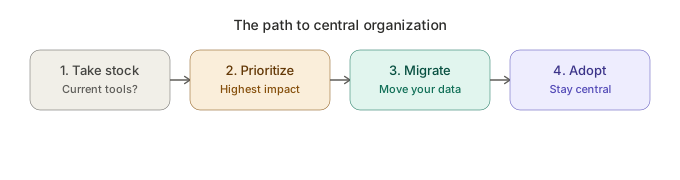
The path to get there
- Take stock: which programs do you currently use, for what?
- Prioritize: which data do you need most often (usually customers and invoices)?
- Migrate: move existing data into a central system
- Adapt: capture new activity centrally going forward, exclusively
Real-world example
A trainer who previously managed customers in a spreadsheet, invoices in a separate tool, and contracts as a PDF archive moved all three areas into one central system. Since then, her dashboard overview has shown at a glance which customers have open invoices or upcoming contract renewals.
What you can do right now
Sketch on a sheet of paper where you currently find which information. If a simple customer question requires more than one source, that's a clear signal to move to a central system.
FAQ
How do I bring order to my office organization? By managing customers, invoices, contracts, and payments in one central, connected system instead of several separate programs.
Which tool is right for centrally organizing office work? Back-office platforms like SmoovOps, which connect partner, invoicing, contract, and payment data in one system.
Archives
- August 2026 (1)
- July 2026 (5)
- June 2026 (4)
- May 2026 (5)
- April 2026 (4)